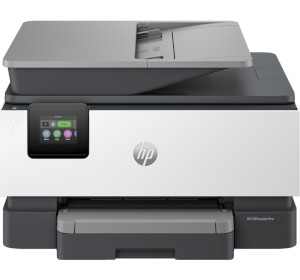
HP OfficeJet Pro 9120e All-in-One Wireless Printer
Copier/Scanner
| Scanning resolution (dpi) | Up to 1200 |
| Colour depth (bit) | 32-bit/64-bit |
| Copy functions |
Two-Sided Lighter/Darker Resize Quality Paper Size Paper Type Collate HP Copy Fix ID Copy Margin Shift Crop Copy Preview Enhancements |
| Copy resolution (dpi) | Up to 600 |
| Copy speed |
Black (maximum, A4): Up to 28cpm Black (draft, letter): Up to 28cpm Black (ISO): Up to 21cpm Black (best, A4): Up to 5cpm Colour (ISO): Up to 14cpm Colour (draft, letter): Up to 21cpm Colour (maximum, A4): Up to 21cpm Colour (best, A4): Up to 5cpm |
| Copy zoom | 25 to 400% |
| First copy out |
Black: As fast as 10 seconds Colour: As fast as 11 seconds |
| Maximum flatbed scan size | 215.9x355.6mm |
| Multiple copy | Up to 99 |
| Output formats |
JPG BMP TIFF RTF TXT PNG |
| Scan speed |
Standard: Up to 8ipm Duplex: Up to 4ipm |
| Scan technology | Contact Image Sensor |
| Scanner type |
Easy slide-off glass Dual pass 2-sided ADF |
Body
| Dimensions (mm) | 439.3x342.5x278 (WxHxD) |
| Weight (kg) | 9.29 |
Connectivity
| Wireless printing | Yes |
| WiFi | Yes - 5 |
Processor
| CPU speed | 1.2GHz |
Display
| Screen size | 2.7-inch |
| Touch screen | Yes - Capacitive Touchscreen |
| Display type | Colour Graphic Display |
Memory
| RAM | 512MB |
Features
| Scheduling | Yes |
Security
| Security features |
SSL/TLS (HTTPS) IPP over TLS WPA2-Enterprise WPA2-Personal WPA3-Personal Certificates configuration Password protect EWS Signed firmware |
Warranty
| Device warranty | 24 months |
Facsimile
| Fax memory | Up to 100 pages |
| Fax resolution (dpi) | 300x300 |
| Fax speed | 4 seconds per page |
Compatibility
| App compatibility | HP |
| Compatibility |
Chrome OS Apple AirPrint Wi-Fi Direct Printing Mopria certified |
Power
| Power supply | AC 100-240V 50/60Hz |
| Power consumption |
Ready: 5.06W Sleep mode: 1.22W Off mode: 0.14W |
System
| System requirements |
Windows 11 Windows 10 Windows Server macOS 11 Big Sur macOS 12 Monterey macOS 13 Ventura macOS 14 Sonoma macOS 15 Sequoia Linux Chrome OS |
Key Information
| Print technology | HP Thermal Inkjet |
Interfaces/Ports
| Ethernet port | Yes |
| USB port | 2x USB 2.0 Type-A |
Printing
| Maximum paper weight supported |
Plain: 60 to 105g/m² Photo: 220 to 280g/m² Envelope: 75 to 90g/m² Card: 163 to 200g/m² |
| Paper sizes supported |
A4 A5 A6 B5(JIS) Card (A4, Hagaki) Photo (13x18cm, 10x15cm) Envelope (A2, C5, C6, DL) 8.5x13 in |
| Paper types supported |
Plain Paper HP Photo Papers HP Matte Brochure or Professional Paper HP Matte Presentation Paper HP Glossy Brochure or Professional Paper Other Photo Inkjet Papers Other Matte Inkjet Papers Other Glossy Inkjet Papers Thick Plain Paper Light/Recycled Plain Paper HP Tri-fold Brochure Paper Glossy |
| First page out |
Black: As fast as 10 sec Colour: As fast as 11 sec |
| Monthly page volume | Up to 1500 |
| Paper input |
Input tray: Up to 250 sheet ADF: Up to 35 sheet |
| Paper output | 60 sheet output tray |
| Print language | HP PCL3 GUI |
| Printing speed |
Black: Up to 20ppm Colour: Up to 10ppm |
Operation
| Operating humidity | 20 to 80% RH |
| Operating temperature | 5 to 40°C |