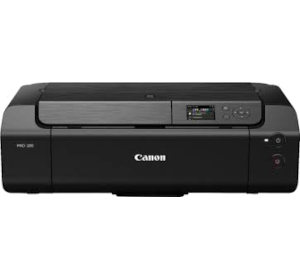
Canon Pixma Pro-200
Ink
| Compatible ink cartridges | CLI-65 |
Body
| Dimensions (mm) | 639x200x379 (WxHxD) |
| Weight (kg) | 14.1 |
Connectivity
| Frequency band | 2.4 GHz/5 GHz |
| Wireless printing | Yes |
| WiFi | Yes - 6 |
Display
| Screen size | 7.5cm |
| Display type | LCD |
Features
| Indoor range (m) | 50 |
| Quiet Operation | Yes |
| Nozzel attachment | 7680 |
| Number of channels |
2.4 GHz: 1-13 5 GHz: W52/W53/W56/W58 |
| Special features |
Protocol: SNMP HTTP TCP/IP |
| Temperature range |
Operating: 5-35°C Recommended: 15-30°C Storage: 0-40°C |
| OSD language | 33 |
Warranty
| Device warranty | 24 months |
Compatibility
| Maximum paper size | B5 |
| Compatibility |
AirPrint Mopria Windows 10 Mobile PIXMA Cloud Link Easy-Photo Print Editor Canon Print |
Connections
| Wireless network connection |
Protocol: SNMP HTTP TCP IP |
Power
| Energy consumption |
Printing: 16W Off: 0.2W Standby: 2.5W Standby USB connection to PC: 1W |
| Power source | Mains |
| Power supply | AC 100-240V 50/60Hz |
Performance
| Noise level | 42.5dB |
Interfaces/Ports
| Ethernet port | Yes |
| USB port | Yes - USB 2.0 |
Software
| Operating system |
Chrome OS Windows 10/8.1/7 SP1 |
Printing
| Borderless printing | Yes |
| Maximum paper weight supported |
Top Tray: Plain Paper: 64-105g/m² Canon genuine paper: 380g/m² Manual Feed: Canon genuine paper: 380g/m² Paper Thickness: 0.1-0.8mm or less Ink End Sensor: Dot count |
| Paper sizes supported |
Printable Paper Length: Top Tray: 322.2mm Borderless: 329mm Manual Feed: 323.4mm Borderless Printing: 329 Top margin:3mm Bottom margin: 5mm Left/Right margin: 3.4mm Fine Art Paper: 25mm Support Media: Top Tray Manual Feed Multi-Purpose Tray |
| Paper types supported |
Top Tray: A3+ A3 A4 A5 B4 B5 LTR LGL Ledger Hagaki Manual Feed: A3+ A3 A4M B4 LTR LGL Ledger Square Multi-Purpose Tray: 120x120mm Borderless A3+ A3 A4 A5 B4 B5 LTR LGL Ledger Hagaki Borderless: A3+ A3 A4 A5 B4 B5 LTR LGL Ledger Hagaki |
| Printing resolution (dpi) | 4800x2400 |
| Printing speed |
A3+: 1 minutes 30 seconds A4: 53 seconds Borderless: 35 seconds |